BSOD in Windows 7 – PFN_LIST_CORRUPT
By admin on Dec 15, 2009 in PC Crash, Windows 7
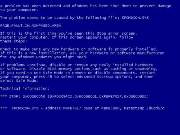 Few days ago I experienced my first Windows 7 problem. My dad’s Toshiba L300 laptop, which was upgraded from Windows Vista to Windows 7 recently, suddenly started showing the Blue Screen Of Death. It appeared randomly and all I could see before the laptop restarted was the PFN_LIST_CORRUPT message. The error code that followed was 0×0000004E.
I could see no reason for it, since the laptop was new, no new software or hardware was installed and the only change was the Windows system upgrade.
This error message means that the Page Frame Number is corrupt, and it usually has to do with bad memory or bad drivers. It comes up in Windows 2000, XP, Vista and 7.
In my case the memory was brand new, but I still ran the Windows 7 memory diagnostic tool, just to be safe. To access this program, you’ll need the Windows 7 installation DVD. Boot from this DVD and follow the instructions on the screen to ‘Repair you computer’. At the next screen, you’ll see some new options on the menu, one of which is the Windows Memory Diagnostic Tool. For detailed instructions on how to get there, please go here.
Next, I suspected that one of the drivers didn’t agree with Windows 7. Even though all drivers installed correctly when the laptop was upgraded, a ‘bad’ driver could still have caused this error, especially a graphic driver. I went to the Toshiba Support site and downloaded their most recent Windows 7 graphic card driver. After this installation, the error hasn’t come back. I’m still testing the laptop, but more than a week later, the BSOD hasn’t reappeared.
Most Web sites I visited recommend that you check your memory and drivers. Test your RAM with memory diagnostic tools (memtest86 and memtest86+) and update all your drivers. If that doesn’t solve your problem, uninstall all programs and/or hardware you added recently and see if that helps. Another thing you could do is update your BIOS (and disable RAID controllers in BIOS).
UPDATE: If you are not sure which driver you need, download Everest Home Edition, a free driver identification tool.

1 Trackback(s)
Post a Comment